A practical guide to three prompting techniques that turn vague requests into useful results
If I had to sum up what I have learned about working with generative AI in a single line, it would be this: better input, better output. The quality of what you get from an AI tool is decided by what you give it.
I see it again and again in the AI adoption work I do with teams. A vague prompt produces a generic answer. A generic answer triggers another prompt, then another, until the result is finally usable — or until we give up and do the task ourselves. Every one of those rounds has a cost:
- Time. Each iteration means writing, waiting, reading and correcting. A well-built prompt gets you there in one or two rounds instead of six.
- Quality and confidence. Each extra round is another chance for the result to drift. When the output keeps missing the point, people stop trusting it, and stop using the tool for the work that matters most.
- Frustration. In my experience, most “the AI doesn’t work” moments are not model failures. They are input problems. Fix the input and the frustration goes with it.
If you build with the API. Developers who call models through an API pay per token, the basic unit a model reads and writes (roughly a word or a fragment of one), so every wasted round is also billed. With a Copilot, ChatGPT or Claude licence you do not pay per token, but plans have usage limits, and long, repetitive conversations reach them sooner.
In this article I share the three techniques I recommend most often to raise the quality of your input: meta-prompting, role prompting and chain-of-thought. For each one, I explain what it is, when I use it and where its limits are.
What better input looks like
Every effective prompt answers four questions. Miss one, and the model fills the gap with assumptions.
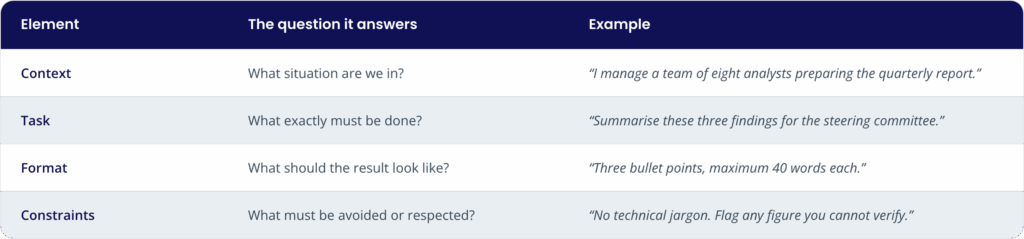
The cheapest lever of all: show an example. On top of these four elements, the fastest way to get the result you want is often to show it. Paste a summary you liked, a model email or two sample rows of the table you expect, and add “follow this format and tone.” One good example removes more ambiguity than a paragraph of description.
The three techniques below build on this foundation. They do not replace it.
1. Meta-prompting: let the AI build the prompt with you
Meta-prompting means using the AI to write, evaluate or improve your own prompts. Instead of asking for the result, you ask for a better way to ask.
Use it in three situations:
- The task is high-stakes and the output has to be right.
- Your prompt keeps producing weak results and you cannot see why.
- You are writing a prompt that other people or teams will reuse.
The process is simple:
- Your prompt: the first attempt, usually too vague.
- The meta-prompt: you ask the AI to evaluate and improve it.
- The improved prompt: precise, structured and reusable.
- A better output: a result you can actually use.
There are four ways to apply it, depending on where you are:
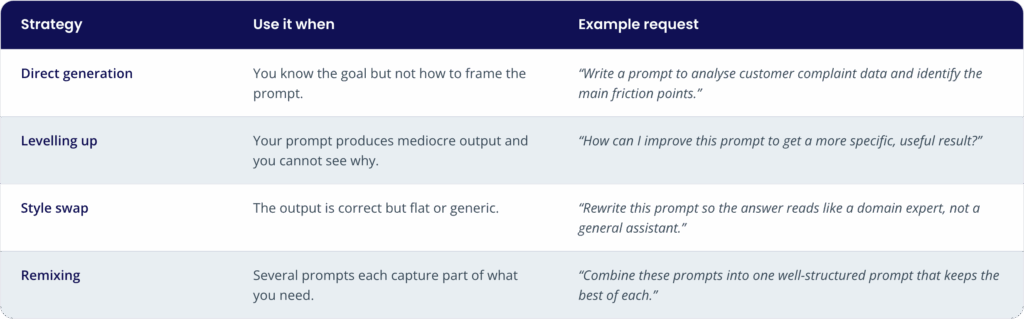
One rule I always share when I train teams makes all four work better: tell the AI what is wrong with the current output and what you need it for. The sharper the diagnosis, the better the fix.
Meta-prompting is not only a user habit. AI providers have built it into their developer tools: OpenAI’s Playground, for example, has a Generate option that writes or improves a prompt from a description of the task, and Anthropic’s Console offers a prompt generator and a prompt improver. These tools are designed for people who build with the API. If you work in Copilot, ChatGPT, Claude or Gemini, you do not need them: simply ask the chat to improve your prompt, as described above. Tellingly, Anthropic’s prompt improver invites you to add feedback on what is and is not working in your current outputs: the same rule I share with teams.
A note on terminology. In academic research, meta-prompting also names a more advanced technique. In Suzgun and Kalai (2024), a single model acts as a “conductor” that breaks a complex task into subtasks, assigns them to “expert” instances of itself, then integrates and verifies the results. This article uses the term in its practical, business sense: asking the AI to help you build better prompts.
2. Role prompting: set the stage once
Role prompting configures the AI to respond as a specific type of expert, with a defined context, rules and purpose. You set the stage once at the start of the conversation, and every response follows that configuration. No need to repeat the context in every message.
It works best for anything related to how something is said: tone, vocabulary, point of view and the dynamics of a conversation. That makes it the right tool for rehearsals, simulations, feedback and role-play.
A strong role prompt has four components:
- Assign a role: “Act as a senior Scrum Master with 10 years of experience leading agile teams in financial services.”
- Set the scenario: “I am a junior project manager about to run my first sprint retrospective. I want to practise handling a conflict between two team members over who owns a deliverable.”
- Define the rules: “Ask me how I would handle each situation before giving feedback. Do not give me the answer. Guide me with questions.”
- Set a stop phrase and a closing output: “When I write ‘retrospective complete’, end the simulation and summarise what I did well and one specific area to improve.”
This is the part that surprises people most when I explain it: of the four components, the role carries the least weight on its own. The scenario, the rules and the closing output are what turn a generic chat into a useful exercise.
What role prompting is not
- It does not make the AI more accurate. Telling a model to “act as a lawyer” does not make it a more reliable legal source. A study of 162 personas presented at EMNLP 2024 (Zheng et al.) found that adding personas did not improve performance on factual questions. The Wharton Generative AI Labs reached the same conclusion in December 2025 and recommend focusing on task-specific instructions instead.
- It does not give the AI real expertise. A role adds no knowledge, empathy or context about your organisation that the model does not already have. The feedback it gives is a starting point, not a verdict.
- It is not persistent, unless you save it. In a chat, the role lives in that conversation and ends with it. When a role prompt works, the natural next step is to save it as persistent instructions: a Project in Claude, a custom GPT or Project in ChatGPT, a Gem in Gemini, or an an agent built with Agent Builder in Microsoft 365 Copilot. Saved that way, it becomes a reusable asset for the whole team, with the same context, rules and closing output every time.
- It is not an AI agent. An agent can plan, connect to external tools and execute multi-step workflows with a degree of autonomy. Role prompting is a conversation technique: the AI takes no action outside the chat.
Data protection. A rehearsal does not need real data. Describe situations in generic terms, without names or identifiable personal or performance information, and only use tools your organisation has approved.
3. Chain-of-thought: make the reasoning visible
Chain-of-thought (CoT) prompting asks the model to work through a problem in intermediate steps before giving its final answer. Google researchers showed in 2022 (Wei et al., NeurIPS 2022) that including worked examples with step-by-step reasoning improves performance on arithmetic, common-sense and symbolic reasoning tasks. Months later, Kojima et al. (2022) found that simply adding “Let’s think step by step”, with no examples at all, also helped.
The principle is simple: a multi-step problem solved one step at a time produces fewer errors than one solved in a single jump. And when the reasoning is written out, you can check it.
There are two ways to apply it:
- Simple CoT: add an instruction such as “Think through this step by step before answering.”
- Guided CoT: spell out the steps you want the model to follow: the order, the criteria and what decides the outcome. In practice, this is task decomposition, and it is more reliable because you define the logic.
Example of a guided CoT prompt:
“We need to decide which of these three suppliers to shortlist. Work through it in this order: 1) list the requirements each supplier meets and misses; 2) compare total cost over three years; 3) identify the main risk of each option; 4) only then give a recommendation, explaining which step decided it.”
I reach for guided chain-of-thought for comparisons, decisions with several criteria, calculations, planning and any analysis where I need to see how the conclusion was reached. I skip it for simple requests such as a summary, a translation or a short email.
The generic version is fading; the guided one stays. The Wharton Generative AI Labs (June 2025) found that many recent models already reason step by step without being asked, and that for dedicated reasoning models an explicit CoT request adds only marginal accuracy at a significant time cost. With the reasoning models and “thinking” modes most tools now include, a generic “think step by step” is close to redundant. Guided CoT is different: it does not ask the model to think, it tells it how to break the task down, in what order and against which criteria. What stays valuable with any model is your criteria and what the answer must show; with reasoning models, prescribe the order only when the result needs it. The takeaway: drop the generic instruction by default, and keep writing out the steps for complex decisions.
Which technique, when
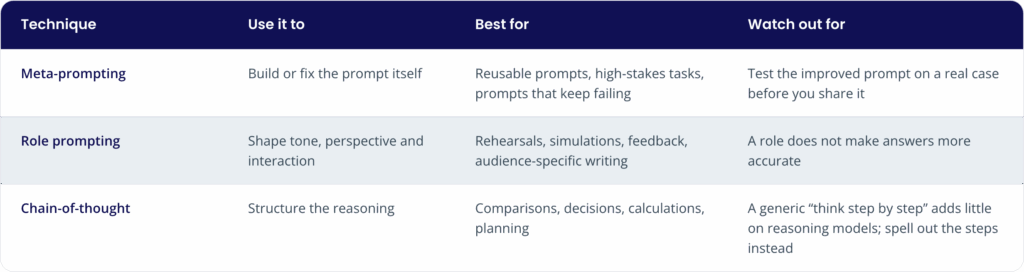
The three combine well. Use meta-prompting to draft a role prompt, or give a role a guided sequence of steps to follow. In every case, the output is only as good as the input.
Getting started
- Pick a prompt you use often whose results do not fully convince you.
- Ask the AI to improve it. Explain what is wrong and what you need the output for.
- Choose one conversation or presentation you want to rehearse and build a role prompt with its four components. If it works, save it as instructions in a Project, GPT, Gem or agent.
- Take one decision or analysis with several criteria and write a guided chain-of-thought prompt for it.
- Share the prompts and saved instructions that work with your team. That is the fastest way to scale what you learn.
Conclusion
After years working where change management meets technology, I am convinced of one thing: for most people in their day-to-day work, the biggest gains in generative AI do not come from switching models. They come from how we ask.
Meta-prompting turns vague requests into precise, reusable instructions. Role prompting gives you a safe space to practise and get feedback, and once saved as instructions, a reusable asset for your team. Guided chain-of-thought makes complex reasoning structured and verifiable.
All three rest on the same principle: better input, better output. Fewer rounds, less time lost, results you can trust, less frustration. And one thing I remind every team I work with: the AI amplifies your judgement, it does not replace it. Validating results and protecting sensitive information remain our responsibility.
If you try any of these techniques, I would love to hear how it goes.
Sources
- Wei, J. et al. (2022). Chain-of-Thought Prompting Elicits Reasoning in Large Language Models. NeurIPS 2022.
- Kojima, T. et al. (2022). Large Language Models are Zero-Shot Reasoners. NeurIPS 2022.
- Suzgun, M. and Kalai, A. T. (2024). Meta-Prompting: Enhancing Language Models with Task-Agnostic Scaffolding. arXiv.
- Zheng, M. et al. (2024). When “A Helpful Assistant” Is Not Really Helpful: Personas in System Prompts Do Not Improve Performances of Large Language Models. Findings of EMNLP 2024.
- Meincke, L. et al. (2025). The Decreasing Value of Chain of Thought in Prompting. Wharton Generative AI Labs.
- Basil, S. et al. (2025). Playing Pretend: Expert Personas Don’t Improve Factual Accuracy. Wharton Generative AI Labs.
- Anthropic. Console prompting tools and Prompt improver (developer tools).
- OpenAI. Prompt generation in the Playground (developer tools).